snappyHexMesh
Overview
snappyHexMesh is a fully parallel, split hex, mesh generator that
guarantees a minimum mesh quality. Controlled using OpenFOAM
dictionaries, it is particularly well suited to batch driven operation.
Key features:
- starts from any pure hex mesh (structured or unstructured)
- reads geometry in triangulated formats, e.g. in
stl,obj,vtk - no limit on the number of input surfaces
- can use simple analytically-defined geometry, e.g. box, sphere, cone
- generates prismatic layers
- scales well when meshing in parallel
- can work with dirty surfaces, i.e. non-watertight surfaces
Meshing process
The overall meshing process is summarised by the figure below:
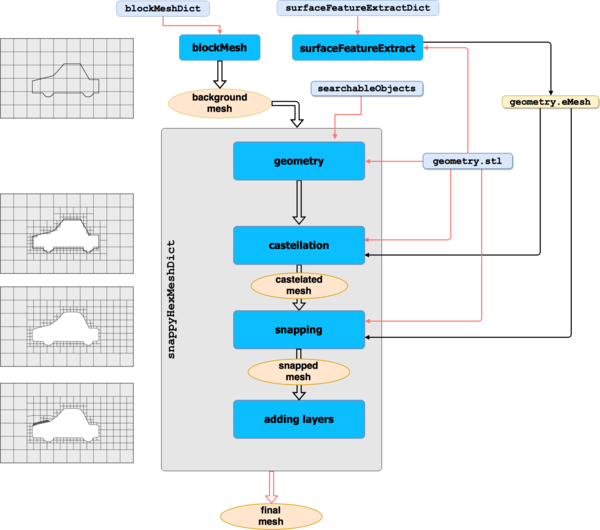
This includes:
- creation of the background mesh using the blockMesh utility (or any other hexahedral mesh generator)
- extraction of features on the surfaces with
surfaceFeatureExtractutility - setting up the
snappyHexMeshDictinput dictionary - running
snappyHexMeshin serial or parallel
Evolution of the snappy mesh for the iglooWithFridges tutorial is shown below:
Configuration
Meshing controls are set in the snappyHexMeshDict located in the case
system directory. This has five main sections, described by the following:
- Geometry: specification of the input surfaces
- Castellation: starting from any pure hex mesh, refine and optionally load balance when running in parallel. The refinement is specified both according to surfaces, volumes and gaps
- Snapping: guaranteed mesh quality whilst morphing to geometric surfaces and features
- Layers: prismatic layers are inserted by shrinking an existing mesh and creating an infill, subject to the same mesh quality constraints
- Mesh quality: mesh quality settings enforced during the snapping and layer addition phases
- Global
Usage
The command snappyHexMesh executes the meshing process.
Synopsis
snappyHexMesh [OPTIONS]
Arguments
No arguments required.Options
-case <dir>       Case directory (instead of current directory)
  -checkGeometry    Check all surface geometry for quality
  -decomposeParDict <file>
                    Alternative decomposePar dictionary file
  -dict <file>      Alternative snappyHexMeshDict
  -dry-run          Check case set-up only using a single time step
  -outFile <file>   Name of the file to save the simplified surface to
  -overwrite        Overwrite existing mesh/results files
  -parallel         Run in parallel
  -patches <(patch0 .. patchN)>
                    Only triangulate selected patches (wildcards supported)
  -profiling        Activate application-level profiling
  -region <name>    Specify mesh region (default: region0)
  -surfaceSimplify <boundBox>
                    Simplify the surface using snappyHexMesh starting from a
                    boundBox
  -doc              Display documentation in browser
  -help             Display short help and exit
  -help-compat      Display compatibility options and exit
  -help-full        Display full help and exit
By default, each of snappyHexMesh's phases, i.e castellation, snapping and
layer addition will write a complete mesh in time folders. This behaviour can
be suppressed by using the option
snappyHexMesh `-overwrite`